
How to generate Pinterest Client ID and Secret key
If you wish to extend or integrate the Pinterest service then you certainly need to use Pinterest’s API. Recently while I also wanted to make use of Pinterest API, it took me a lot of efforts to generate Pinterest App’s Client ID and Secret Key because Pinterest Developers website doesn’t make it that intuitive. After searching for more than half an hour I found it and thought it might be a good idea to share this very difficult trick on the blog.
Here are the steps you need to follw in order to generate Pinterest Client ID and Secret Key:
1. Head over to Pinterest Develpers website: https://developers.pinterest.com/
2. Create an APP


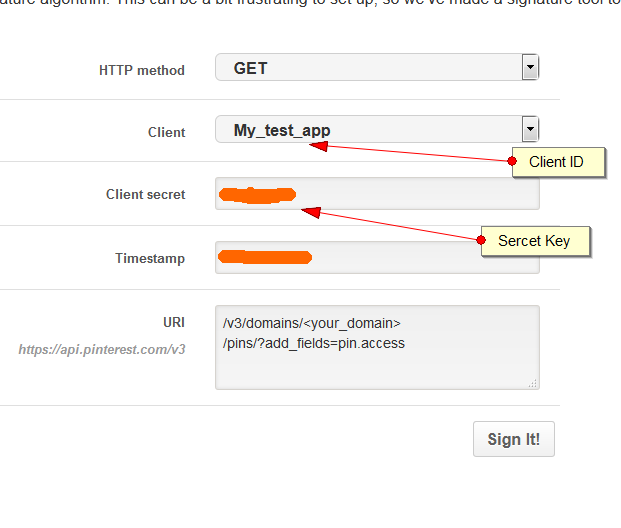
3. Then you need to go to this page: https://developers.pinterest.com/tools/signature/ and that’s where you can get your client ID and Secret Key:
If you wish to extend or integrate the Pinterest service then you certainly need to use Pinterest’s API. Recently while I also wanted to make use of Pinterest API, it took me a lot of efforts to generate Pinterest App’s Client ID and Secret Key because Pinterest Developers website doesn’t make it that intuitive. After searching for more than half an hour I found it and thought it might be a good idea to share this very difficult trick on the blog.
Here are the steps you need to follw in order to generate Pinterest Client ID and Secret Key:
1. Head over to Pinterest Develpers website: https://developers.pinterest.com/
2. Create an APP
3. Then you need to go to this page: https://developers.pinterest.com/tools/signature/ and that’s where you can get your client ID and Secret Key: